
- Why Screenshots Are the Wrong Evaluation Method
- Clean Code Structure and Component Organisation
- React and TypeScript Version Currency
- Reusable, Composable Components
- Authentication Implementation
- Working Chart Integration
- Genuine Responsive Behaviour
- Documentation Quality
- Pre-Purchase Checklist
- React Admin Dashboard Templates Worth Considering
- Final Thoughts
- React Admin Templates Built the Right Way
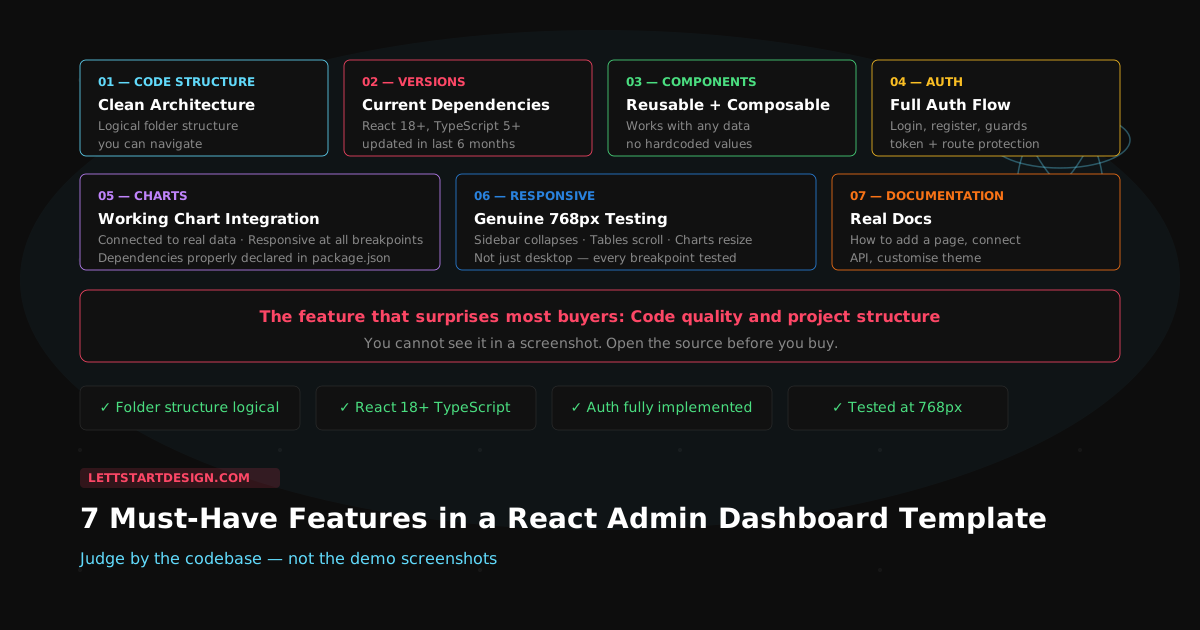
The feature that surprises buyers most is not charts, authentication, or responsive layouts — even though those are what most people ask about. The feature that actually determines how well a React admin template works in a real project is code quality and project structure. You cannot see either of those in a demo screenshot. This post tells you how to check both before you buy.
From selling React templates since 2021: Here is the most common mistake developers make when evaluating a React admin dashboard template: they judge it by its screenshots instead of its codebase. A template can look impressive in a demo and be a maintenance problem within two weeks of development. A template can look plain and be a genuinely solid foundation that scales cleanly across 50 screens.
The templates that receive the best feedback from our customers are the ones that balance clean architecture with practical features — not the ones with the most pages. This post gives you a checklist of the 7 features that actually determine whether a React admin dashboard template works in production.
Why Screenshots Are the Wrong Evaluation Method
Demo screenshots show you the visual output of a template. They do not show you the folder structure, the component architecture, the TypeScript configuration, the authentication approach, or the state management pattern. All of those things determine how much time you spend fighting the template versus building your product.
A template with a beautiful demo can have all component logic in a single file, no TypeScript, hardcoded values throughout, and a routing setup that breaks the moment you add a new page. A template with a plain demo can have clean component separation, strict TypeScript, reusable hooks, and a folder structure that makes adding a new screen a five-minute task. The demo tells you almost nothing about which one you are getting.
Here are the 7 features to check before you buy.
Clean Code Structure and Component Organisation
The single most important feature in a React admin dashboard template is not visible in any screenshot. Open the source files and look at the folder structure. A well-organised React template should separate concerns clearly — components, pages, hooks, services, utils, and types should each live in their own logical location. You should be able to find the sidebar component, the authentication hook, and the API service without hunting through unrelated files.
What a clean React template folder structure looks like:
-
src/components/— reusable UI components only -
src/pages/— page-level components, one per route -
src/hooks/— custom React hooks for shared logic -
src/services/— API calls and data fetching -
src/types/— TypeScript interfaces and types -
src/utils/— pure utility functions
If the template's source has everything in a single components/ folder with no further separation,
that is a signal that the architecture has not been thought through. It will not scale. Adding your tenth custom
screen to an unorganised template is significantly harder than adding it to a well-structured one.
React and TypeScript Version Currency
Check the package.json before buying any React template. The React version, TypeScript version, and
major dependency versions tell you immediately whether the template is actively maintained or was built two years
ago and left untouched.
A template built on React 16 or 17 is not just outdated — it is missing hooks improvements, concurrent mode, and
the rendering improvements that came in React 18 and 19. A template with TypeScript set to
strict: false or no TypeScript at all will surface type errors the moment you integrate your own data.
Outdated dependencies also mean security vulnerabilities and compatibility issues with newer libraries you will want
to use.
Minimum versions to look for in 2026:
- React 18+ (React 19 preferred)
- TypeScript 5+ with strict mode enabled
- Vite or Next.js 14+ as the build tool
- Dependencies updated within the last 6 months
Reusable, Composable Components
A React admin template should ship with genuinely reusable components — not page-specific components that happen to
be extracted into separate files. The difference matters significantly as you build out your product. A reusable
DataTable component should work with any data shape. A reusable StatCard should accept any
value, label, and trend. A reusable Modal should handle any content.
Templates that balance clean architecture with practical features consistently outperform feature-heavy templates in real projects. The most impressive templates are not the ones with 200 pages — they are the ones where every component is genuinely reusable and the 20 pages they ship cover the patterns you actually need.
After selling React templates since 2021, the pattern is consistent — templates that receive the best reviews are the ones with clean, composable components, not the ones with the most pages. A template with 30 well-built components that compose cleanly is more valuable than one with 200 pages of hardcoded, duplicated UI code.
Authentication Implementation
Authentication is the feature that takes the longest to build correctly from scratch — and the one most templates either skip or implement poorly. A production-ready React admin template should include a complete authentication flow: login, registration, forgot password, and protected route guards that redirect unauthenticated users.
Beyond the UI, check how the template handles the authentication state. Is it using React Context, a state management library, or something custom? Is the token stored securely? Are API requests automatically including the auth token? Are protected routes actually protected — not just hidden, but genuinely inaccessible to unauthenticated users?
Authentication checklist for any React template:
- Login, register, and forgot password screens included
- Route guards redirect unauthenticated users
- Auth state managed in React Context or state library
- API interceptor injects auth token automatically
- Token refresh or expiry handling present
- Logout clears state and redirects cleanly
Working Chart Integration
Charts are expected in any admin dashboard — the question is whether they are actually integrated or just dropped
in as static images. Open a chart component in the template source. Is it connected to real (or mock) data? Is it
responsive — does it resize correctly on different screen sizes? Are the chart library dependencies properly
declared in package.json?
The most common chart issues in purchased templates: charts that are not responsive and overflow on mobile, chart libraries that conflict with newer React versions, and chart components so tightly coupled to specific data shapes that swapping in your own data requires significant refactoring. All of these are checkable before you buy.
Genuine Responsive Behaviour
Resize the demo to 768px — the tablet breakpoint where most dashboard layouts break — before buying any template. If the sidebar overlaps the content, the charts overflow their containers, or the navigation disappears without a working mobile menu, those are bugs that will cost you time to fix.
Genuine responsive behaviour means the template has been tested and adjusted at every breakpoint, not just designed at desktop size. For admin dashboards specifically, the sidebar collapse behaviour on mobile, the table horizontal scroll on small screens, and the chart resize behaviour are the three areas where most templates have problems.
Documentation Quality
Documentation quality is a reliable proxy for overall template quality. A template with thorough documentation — installation steps, component API references, customisation guides, deployment notes — is almost always a template where the author has thought carefully about the developer experience. A template with no documentation or documentation that is a single README file with five lines is almost always a template where the author shipped quickly and moved on.
Check specifically: Is there documentation for how to add a new page? How to connect a real API? How to customise the colour theme? If none of those are documented, you will be reverse-engineering the template to do the most basic customisation tasks. Budget time for that before you commit.
Pre-Purchase Checklist
React Admin Dashboard Templates Worth Considering
Proctu — React 19 + Next.js 15 Admin Dashboard
Proctu is a React Next.js admin dashboard built for patient and hospital dashboards, doctor admin panels, and general healthcare applications. It is a single-page app with 60+ pages covering dashboards, chat, calendar, widgets, tables, charts and sidebar layouts.
- React 19 and Next.js 15 with Redux Toolkit for state management
- React Bootstrap with Bootstrap 5.3
- 60+ pages: dashboards, chat, calendar, tables, charts
- Authentication pages included
- Patient, doctor and appointment screens that adapt to other data-heavy admin panels
Final Thoughts
The React admin dashboard template that makes your team work faster is not necessarily the one with the most pages or the most impressive demo. It is the one with clean component architecture, current dependencies, a complete authentication flow, genuine responsive behaviour, and documentation that tells you how to customise it.
Before your next React template purchase, spend five minutes with the source code instead of five minutes with the
demo. Check the folder structure, open the package.json, find the authentication implementation, resize
to 768px. Those five minutes will tell you more about whether the template works in production than any screenshot
ever will.
Browse the full React templates collection or reach out if you need a direct recommendation based on your specific project.