
Most developers initially evaluate admin dashboard templates on visual design — and that's understandable, it's what you see first. But what they consistently underestimate is the value of well-structured code, reusable UI components, responsive layouts, and clean documentation. Those four things determine how fast you can actually build with the template. The visual layer is the easiest part to change. The architecture is not.
What buyers overlook: Picking an admin dashboard template based on how it looks in a demo is like judging a car by its paint job. The demo is designed to impress. What you're actually evaluating is whether you can build a production application on top of it without fighting the code every step of the way.
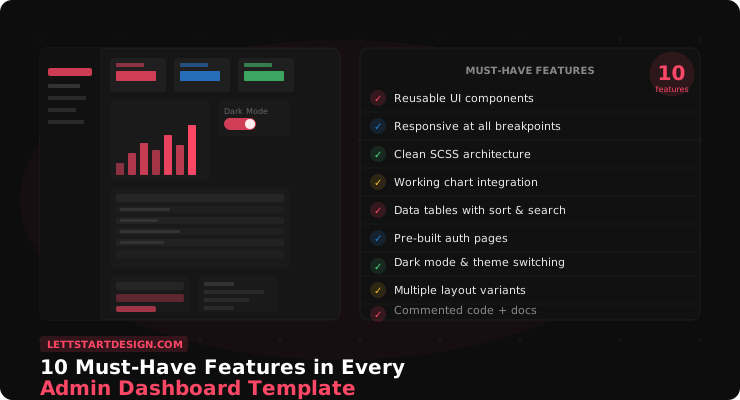
Here are the 10 features that separate a genuinely useful admin dashboard template from one that looks good and performs poorly.
We don't have a customer forum yet, but the feedback we see on other platforms is consistent: what customers mention most is how the template makes customization easier and helps them launch faster. Not the animations. Not the color palette. The components and the code quality. Those are the things that determine whether a project ships on time.
The 10 Must-Have Features
Well-Structured, Reusable UI Components
This is the feature most buyers underestimate — and the one that matters most once you're actually building. A good component library means you can drop a data table, a stat card, or a modal into any page in minutes. A bad one means you're copy-pasting and manually fixing inconsistencies every time.
Look for components that are self-contained — each one should work independently without depending on styles defined elsewhere. Check how many component types are included: cards, badges, alerts, modals, tooltips, dropdowns, tabs, and accordions at minimum. The broader the component library, the less you build from scratch.
In feedback we receive across platforms, customers consistently say that good component coverage is what makes customization faster and helps them launch projects on time. It's not the feature they look for first. It's the one they mention most afterward.
Responsive Layout Across All Breakpoints
Responsive doesn't mean "works on mobile." It means the layout is tested and intentional at every major breakpoint — 375px mobile, 768px tablet, 1024px laptop, 1440px desktop. The breakpoint that gets skipped most often is the tablet range, and it shows.
Layouts that look great on desktop and passable on mobile can feel completely broken on a 768px iPad. This happens because templates are often designed primarily for the two extremes and the middle is an afterthought. Before buying, open the demo on a tablet or resize your browser to around 768px width. If the layout looks cramped or broken there, it will cause problems in production.
Clean, Documented SCSS Architecture
This is the feature that determines how fast you can customize the template for a specific project. A well-organized SCSS structure — with a variables file for colors, fonts, and spacing — means rebranding takes minutes. Without it, you're hunting through thousands of lines of compiled CSS to find where a specific color is defined.
Check for a variables.scss or equivalent file at the root of the SCSS folder. That file should
contain all major design tokens. If a template doesn't include SCSS source files at all — only compiled CSS —
skip it. You'll regret it the first time a client asks to change the primary color.
Working Chart Integration
Charts are the core of most admin dashboards — revenue, analytics, user growth, conversion rates. A template that ships with pre-configured chart examples in ApexCharts, Chart.js, or ECharts saves significant setup time. More importantly, working chart examples show you exactly how to wire real data into the visualization layer.
The key word is working. Click every chart in the demo. If they render as blank areas or throw console errors, those charts won't work in your project either. The demo is the best preview of the production experience.
- Line, bar, pie, and donut charts as a minimum
- Pre-configured with sample data you can swap for real data
- Responsive — charts should resize correctly on mobile without breaking
- Multiple chart library support (ApexCharts + ECharts is the gold standard)
Data Tables with Sorting and Search
Almost every admin panel needs to display tabular data — users, orders, transactions, inventory. A pre-integrated data table component with sorting, search, and pagination saves a significant amount of implementation time and ensures the table works correctly across different screen sizes from the start.
Look for DataTables.js or a similar library pre-configured with the template's visual style. Test the search field and column sorting in the demo. These are table stakes — literally — for any admin interface.
Pre-Built Authentication Pages
Login, signup, forgot password, and email verification screens. These pages are needed in almost every web application and building them from scratch to match your dashboard's design system takes more time than it should. A template that includes polished, matching auth pages eliminates that work entirely.
Check that the auth pages share the same design language as the dashboard — same typography, same component style, same spacing. A login page that looks like it came from a different template is a common sign of a template that was assembled rather than designed.
Dark Mode and Theme Switching
Dark mode is no longer optional for professional web applications. Users expect it, and implementing it properly after the fact is significantly more work than building on a template that already supports it. A proper dark mode implementation means more than inverting colors — it requires a complete alternative color palette that maintains contrast ratios and readability.
Look for a template where dark mode persists across page navigation — ideally saved to localStorage so the user's preference is remembered between sessions. If the demo loses the dark mode setting when you navigate between pages, the implementation is incomplete.
Multiple Dashboard Layout Variants
Different applications have different navigation requirements. A vertical sidebar works for most cases, but horizontal navigation suits certain SaaS tools better. A collapsed icon-only sidebar works well for data-dense applications where screen real estate matters. A template with multiple layout variants gives you the flexibility to choose the right structure for your specific product rather than forcing your product into the template's default layout.
Clean, Commented Code
This is invisible in a demo and critical in production. Well-commented code means any developer can open the project and understand what each section does without spending an hour reverse-engineering the structure. It also makes handoff to a client's internal team — or a different developer on your team — significantly smoother.
Before purchasing, if the template offers a code preview or a GitHub repository, open a few files and scan the comments. A template where the developer clearly explained their decisions is a template built by someone who expected other people to use it.
Clear Documentation and Active Maintenance
Documentation quality is directly proportional to how much time you spend stuck. A template with a comprehensive setup guide, component documentation, and troubleshooting section reduces your dependency on support and lets you move faster independently.
Active maintenance matters just as much. A template that hasn't been updated in two years is likely to have compatibility issues with current Bootstrap versions, modern browser APIs, and updated JavaScript dependencies. Check the last update date before committing to a template you'll build a long-term project on.
✅ Pre-Purchase Checklist — Run Through This Before Buying
- Does the demo have a component showcase page? Click every component.
- Resize the browser to 768px width — does the layout hold up?
- Do all charts render in the demo without console errors?
- Are SCSS source files included in the download?
- Are authentication pages included and visually consistent with the dashboard?
- Does dark mode persist when you navigate between pages?
- Is there more than one layout variant (vertical sidebar, horizontal, collapsed)?
- When was the template last updated?
- Is there documentation beyond a basic readme?
Final Thoughts
Visual design is the last thing to evaluate in an admin dashboard template, not the first. The things that will actually determine whether your project ships on time — component coverage, code quality, responsive behavior, chart integration, documentation — are all invisible in a screenshot.
Use the checklist above as a filter before you buy. A template that passes all nine points will save you far more time than its price tag suggests. A template that fails three or four of them will cost you that time back in debugging and rebuilding work.
Browse our full admin dashboard templates collection — these are the same criteria we use when building and reviewing each template on LettStartDesign.
Find an Admin Dashboard That Has All 10
Marvel Angular covers every feature on this list — components, charts, dark mode, auth pages, and clean code.
View Marvel Angular →