
- The One Question That Matters
- The Biggest Mistake SaaS Founders Make
- What a SaaS Admin Dashboard Actually Needs
- What to Ignore When Evaluating Templates
- Which Framework for Your SaaS Dashboard
- The Evaluation Checklist
- SaaS Admin Dashboard Templates Worth Considering
- Final Thoughts
- Admin Dashboard Templates That Make Teams Faster
The most common mistake SaaS founders make when picking an admin dashboard template is choosing the one that looks most impressive in the demo. The question that actually matters is simpler and more useful — will this template make my team work faster? Everything else follows from that.
From building and selling SaaS templates since 2021: The pattern repeats consistently. A SaaS founder evaluates admin dashboard templates, picks the one with the most animations, the most widgets, and the most impressive feature list. Development starts. A few weeks in, the team realises most of those features are unnecessary, the codebase is overly complex to navigate, customisation is slow because the architecture was not designed with extension in mind, and outdated dependencies are already causing compatibility issues.
By the time the problem is clear, significant development time has been lost and switching templates means losing more. This guide helps you avoid that mistake before it happens.
The One Question That Matters
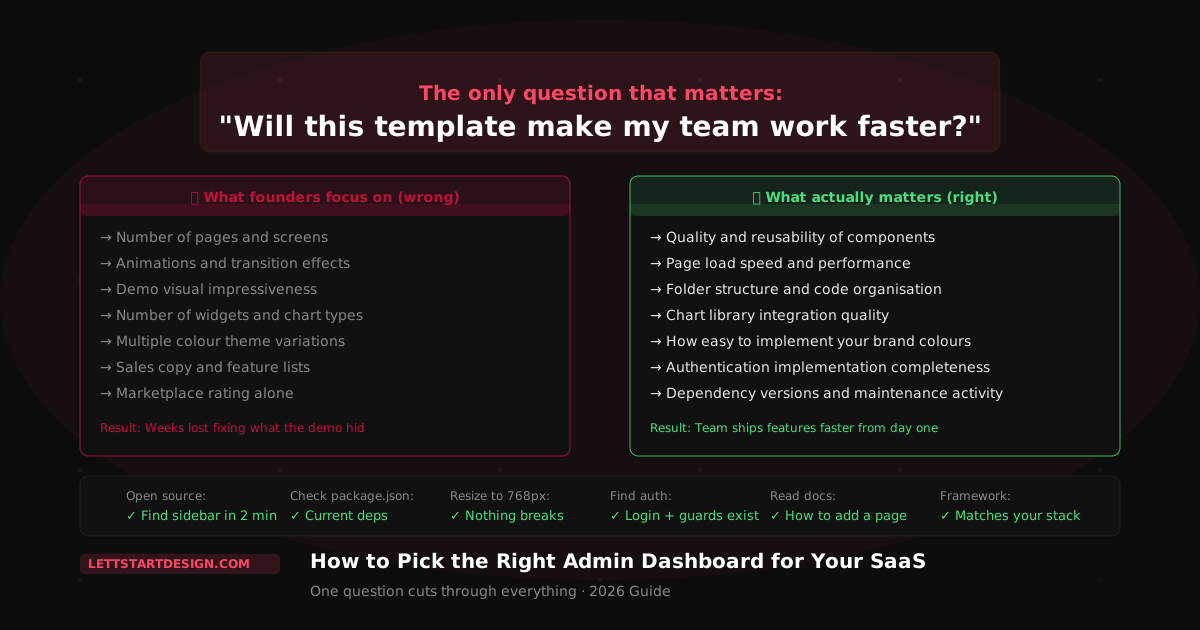
Before evaluating any admin dashboard template, ask one question: will this make my team work faster?
Not "does it look impressive?" Not "how many pages does it have?" Not "does it have the most components?" Those questions evaluate the demo. The only question that matters is whether the template reduces the time your team spends building the product versus building the dashboard infrastructure around the product.
A template that makes your team work faster has clean, understandable code. It has the components your SaaS actually needs. It has authentication already implemented. It has a folder structure your developers can navigate without a map. It has current dependencies that do not conflict with the libraries you want to use. Everything else is secondary.
The Biggest Mistake SaaS Founders Make
The most consistent mistake is choosing a feature-packed template because it looks impressive in the demo — then discovering the actual problems once development starts.
What happens after choosing the wrong template:
- Most template features are unused — adding dead code and complexity
- The codebase is difficult to navigate — finding the right file takes minutes, not seconds
- Customisation is slow — the template was not designed for extension
- Outdated dependencies cause conflicts with new libraries
- Switching templates mid-project loses more time than the original mistake
The teams that avoid this pattern are the ones who evaluate templates by their codebase, not their demo. They look at the folder structure, the component architecture, the dependency versions, and the documentation before they look at the page count or the animation library.
I have seen this happen more than once — a developer buys the template with 400 pages and 50 widgets, then spends three weeks just understanding the codebase before writing a single line of product code. A template with 40 well-organised pages and clean component architecture would have had them shipping features in day two. More is not better. Organised is better.
What a SaaS Admin Dashboard Actually Needs
Most SaaS products need the same core set of admin dashboard screens. The list is shorter than most template demos suggest:
✅ Core SaaS Dashboard Screens
- Main dashboard with key metrics
- User management table
- Settings and profile pages
- Billing and subscription screen
- Login, register, forgot password
- Analytics or reporting view
- Notifications or activity feed
⚠️ Features You Probably Do Not Need
- 50+ pre-built page variations
- Complex animation libraries
- Multiple icon packs
- Unused eCommerce screens
- Multiple redundant landing page layouts
- Third-party widget integrations you will not use
A template that covers the left column cleanly and efficiently is worth more than one that covers both columns but does neither well. When evaluating templates, ask: does this have the screens my SaaS specifically needs? The answer is usually yes for any reasonable template. The follow-up question — does it have them in a way that is easy to customise and extend — is where most templates fail.
What to Ignore When Evaluating Templates
| What Founders Focus On | What Actually Matters |
|---|---|
| Number of pages and screens | Quality and reusability of components |
| Animation and transition effects | Performance and page load speed |
| Demo visual impressiveness | Folder structure and code organisation |
| Number of widgets and chart types | Chart library integration quality |
| Multiple colour theme variations | How easy it is to implement your own brand colours |
| Sales copy and feature lists | Authentication implementation completeness |
| Template marketplace rating alone | Dependency versions and maintenance activity |
Which Framework for Your SaaS Dashboard
Framework choice matters for long-term maintainability — pick the framework your team knows and will be productive in from day one.
Quick framework guidance for SaaS dashboards:
- Angular 22 — Large teams, enterprise SaaS, long-term projects. Strict conventions, built-in DI, consistent architecture across the whole team.
- React 19 / Next.js 15 — Startup MVPs, SaaS with SEO requirements, teams wanting flexibility. Largest ecosystem, fastest iteration cycle.
- Bootstrap 5 — Teams that know Bootstrap. Fastest path to a complete component library without additional setup.
Do not pick a framework because the template demo looks good. Pick the framework your developers are productive in — then find the best template built on that framework. The productivity gap between a team working in their native framework and a team learning a new one during a product build is significant.
The Evaluation Checklist
Use this before purchasing any admin dashboard template for your SaaS:
SaaS Admin Dashboard Templates Worth Considering
Proctu — React 19 + Next.js 15 Admin Dashboard
Proctu is a React Next.js admin dashboard built for patient and hospital dashboards, doctor admin panels, and general healthcare applications. It is a single-page app with 60+ pages covering dashboards, chat, calendar, widgets, tables, charts and sidebar layouts.
- React 19 and Next.js 15 with Redux Toolkit for state management
- React Bootstrap with Bootstrap 5.3
- 60+ pages: dashboards, chat, calendar, tables, charts
- Authentication pages included
- Patient, doctor and appointment screens that adapt to other data-heavy admin panels
Marvel Angular — Angular 21 SaaS Admin Dashboard
For SaaS products built by larger teams or requiring enterprise-grade Angular architecture. 120+ pages, 7 dashboard layouts, Signals, standalone components, and authentication pre-built. The template that best demonstrates what happens when dashboard development is the main focus — not an afterthought added to a generic template.
- Angular 21 with Signals, standalone, modern control flow
- 120+ pages across SaaS, CRM, analytics, and eCommerce dashboards
- Pre-built auth pages, route guards, HTTP interceptors
- ApexCharts and ECharts — 50+ chart types pre-configured
- Full SCSS variable system — rebrand in one file
- Free updates for as long as the template exists — stays current across Angular major releases
Final Thoughts
The right admin dashboard template for your SaaS is not the most impressive one — it is the one that makes your team work faster. That means clean code your developers can navigate, current dependencies that do not block you from using the libraries you need, authentication that is already implemented, and component architecture that makes adding new screens straightforward rather than painful.
The template with 400 pages rarely makes teams faster. The template with 40 well-organised pages almost always does. Start with the question — will this make my team work faster — and evaluate everything else from that anchor.
Browse the full admin dashboard templates collection, try a free template before committing, or reach out directly if you need help choosing the right template for your specific SaaS product.