
- Framework vs Utility — The Core Difference
- What Bootstrap 5 Gives You Out of the Box
- Why Teams Choose Angular + Bootstrap
- Head-to-Head Comparison for Admin Panels
- When Tailwind Is Actually the Better Choice
- Angular 21 + Bootstrap Templates Worth Considering
- Final Thoughts
- Angular 21 + Bootstrap 5 — Ready to Build
I've been using Bootstrap since version 3 in 2013. Back then it was the obvious choice — responsive websites were genuinely hard before Bootstrap made the grid system accessible to every developer. That's over a decade of working with Bootstrap across projects, clients, and now across every template I build and sell on LettStartDesign. When I say Bootstrap still wins for admin panels, that's not brand loyalty talking. It's pattern recognition.
Where I'm coming from: Tailwind is everywhere right now and the hype is real — it solves genuine problems. But I keep watching developers reach for Tailwind when building Angular admin dashboards and then spend significantly more time on component work than they needed to. The reason is simple and worth explaining properly.
This post makes the case for Angular 21 + Bootstrap 5 for admin panel development — honestly, including the situations where I'd point you toward Tailwind instead.
Framework vs Utility — The Core Difference
This is the distinction most comparisons gloss over — and it's the one that matters most for admin panel development.
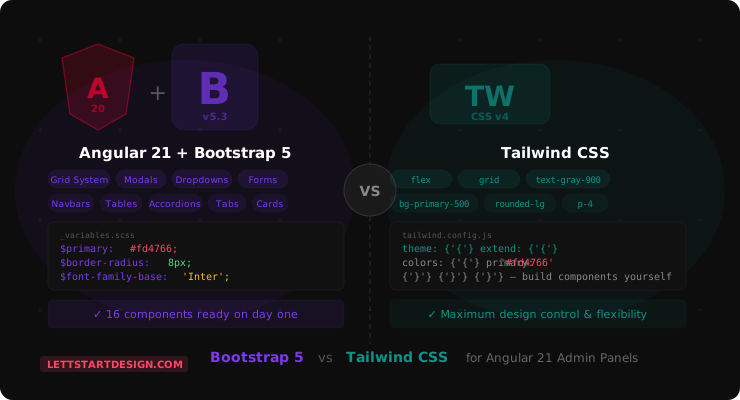
Bootstrap 5 is a complete UI framework. It ships with a responsive grid system, a full component library, JavaScript behaviours, and utility classes. You get working navigation, modals, dropdowns, tabs, accordions, forms, and tables immediately — without writing a line of custom CSS for any of them.
Tailwind CSS is a utility framework. It gives you low-level utility classes — spacing, colours, typography, layout — and you compose those utilities into components yourself. The components don't exist until you build them. That's a deliberate design decision and it's genuinely powerful for custom product design. But for an admin dashboard where you need 30 different UI components working consistently, it means building every one of them before you can work on actual product features.
The practical implication for Angular admin dashboards: Bootstrap 5 gets you to a working interface significantly faster. Tailwind gives you more design control once you've invested the time to build your component library. Which of those two things matters more depends entirely on what you're building.
What Bootstrap 5 Gives You Out of the Box
This is the concrete answer to why Bootstrap wins for admin panels — the component coverage. Every item below is production-ready, accessible, responsive, and available immediately when you start a Bootstrap 5 project:
With Tailwind, every single one of those components is something you build yourself — or source from a separate component library like Headless UI, Radix, or shadcn/ui. Those libraries are good. But they add dependencies, require configuration, and each has its own API to learn. Bootstrap ships all of this in one package with one consistent design language.
For an admin dashboard with 40, 60, or 120 pages, that component coverage gap is substantial. Every page needs navigation, tables, forms, modals, and dropdowns. Bootstrap has them. Tailwind requires you to build or assemble them first.
Why Teams Choose Angular + Bootstrap
The feedback I hear most consistently from customers who specifically chose an Angular + Bootstrap template over Tailwind alternatives: their team already knows Bootstrap. The grid system, component classes, and utility patterns are already understood by every developer on the project. There's no onboarding overhead, no documentation to read before writing the first component, and no consistency debates about how to implement a specific pattern in utility classes.
That's a more significant advantage than it sounds. In a team of four developers, getting everyone to write Bootstrap components consistently takes almost no coordination. Getting four developers to write consistent, maintainable Tailwind utility class strings without a design system and style guide is an ongoing effort.
Bootstrap 5's SCSS variable system also suits the Angular + Bootstrap combination particularly well. Rebrand an
Angular + Bootstrap admin template for a new client — change primary colour, border radius, font family — in a
single _variables.scss file. The entire component library updates. In Tailwind, the equivalent
configuration lives in tailwind.config.js and requires purge configuration, JIT mode awareness, and
custom theme tokens to achieve the same result.
I've been building with Bootstrap since v3 in 2013. What kept me on it wasn't inertia — it was watching client after client prefer it. The ease of creating responsive layouts, the familiarity of the grid, the fact that their in-house developer could maintain it without relearning a styling paradigm. Bootstrap has always won on practical grounds for the kind of projects that become admin dashboards.
Head-to-Head Comparison for Admin Panels
| Factor | Angular 21 + Bootstrap 5 | Angular + Tailwind | Winner |
|---|---|---|---|
| Components out of box | Complete library — grid, modals, forms, nav, tabs | Utility classes only — build components yourself | Bootstrap |
| Time to first working UI | Fast — components ready immediately | Slower — component setup required first | Bootstrap |
| Team onboarding | Fast — most Angular developers know Bootstrap | Requires Tailwind knowledge and conventions | Bootstrap |
| Theming and rebranding | Single SCSS variables file — fast and clean | tailwind.config.js — more setup required | Bootstrap |
| Custom product design | Good — SCSS customization | Excellent — full utility control | Tailwind |
| Design consistency | Built in — Bootstrap design system | Depends on team discipline | Bootstrap |
| Bundle size | Larger base — tree shaking helps | Smaller — only used utilities included | Tailwind |
| Template availability | Extensive — mature ecosystem | Growing — fewer complete options | Bootstrap |
| Long-term maintainability | Excellent — stable API, semantic classes | Good — requires consistent conventions | Bootstrap |
| Marketing and branding pages | Good | Excellent — more design freedom | Tailwind |
✅ Bootstrap 5 Wins For
- Admin dashboards with many components
- Teams with mixed frontend experience
- Projects requiring fast delivery
- Long-term maintained enterprise apps
- Client projects needing easy handoff
- Anyone using a template as foundation
✅ Tailwind Wins For
- Highly custom product design
- Experienced, opinionated frontend teams
- Marketing and brand-heavy websites
- Long-term design systems from scratch
- Projects where bundle size is critical
When Tailwind Is Actually the Better Choice
I said this post would be honest — so here it is.
The honest version is this — Tailwind and Bootstrap solve different problems. Tailwind optimises for design freedom and bundle efficiency. Bootstrap optimises for component coverage and development speed. For an admin dashboard where you need 30 working components immediately and your team already knows Bootstrap — Bootstrap wins. For a custom-designed product where visual differentiation is the core value proposition and you have the team to build a component library — Tailwind is worth the investment.
Most admin dashboards are not the second type of project. Most admin dashboards need a sidebar, a table, some charts, a few modals, and a form. Bootstrap has all of those. Tailwind requires you to build them.
Angular 21 + Bootstrap Templates Worth Considering
Marvel Angular — Complete Admin Dashboard
120+ pages, 350+ Bootstrap components, 7 dashboard layouts, full dark mode, and Angular 21 with Signals and standalone components. This is the template that demonstrates exactly what the Angular + Bootstrap stack can deliver — a complete production admin panel without building a single component from scratch. Best-selling across TemplateMonster, Gumroad, and LettStartDesign.
- Angular 21 with standalone components, Signals, modern @if/@for control flow
- Bootstrap 5.3 — complete component library throughout
- 120+ pages covering SaaS, CRM, eCommerce, analytics, and marketing dashboards
- ApexCharts and ECharts — 50+ chart types pre-configured
- Full SCSS variable system — rebrand in one file
- Pre-built auth pages, route guards, HTTP interceptors included
Adminox — Flat Design Angular + Bootstrap Panel
If Marvel is the full-featured option, Adminox is the lean one. Flat professional design and clean Bootstrap 5 architecture. For teams building internal tools and corporate dashboards where simplicity is the requirement, Adminox delivers the Angular + Bootstrap combination without the overhead of a 120-page template.
- Clean flat design — Bootstrap 5 components, zero visual noise
- Well-commented SCSS — easy to customize and hand off to clients
- Core admin components: sidebar, charts, tables, stat widgets, forms
- Responsive Bootstrap grid throughout — consistent at every breakpoint
Final Thoughts
Bootstrap has been the right choice for admin panel development since version 3, and Angular 21 makes it better — not worse. Angular 21's standalone components pair cleanly with Bootstrap's component classes. The SCSS variable system integrates naturally with Angular's build pipeline. And the combination gives development teams a complete, consistent UI foundation that doesn't require assembling a component library before writing a single feature.
Tailwind is a genuinely excellent tool for the right use case. But building an admin dashboard with 40+ pages is not that use case unless you have the team, the time, and the specific need for maximum design customisation. Most admin dashboards don't. They need a working sidebar, reliable tables, accessible forms, and charts that render correctly. Bootstrap 5 delivers all of that on day one.
That's why this stack still wins for admin panels in 2026. Not because Bootstrap is the newest or most talked-about tool — but because it solves the actual problem faster and more completely than the alternative.
Browse the full Angular templates collection or reach out if you need a recommendation for your specific project.