
- What Actually Changed Between Angular 15 and 22
- The Real Migration Challenges
- Step-by-Step Migration Approach
- The Change Detection Problem — What Always Breaks
- What Angular Dashboard Customers Actually Ask
- Migration Checklist
- When a Fresh Template Makes More Sense
- Final Thoughts
- Start With Modern Angular Architecture
I have been building Angular admin dashboard templates since 2021 and have watched the framework evolve from NgModule-heavy v15 architecture to the standalone, signal-first v22 approach. The most common question from our customers is not about a specific API — it is how to bring years of existing code into Angular 22 without rebuilding everything from scratch. This guide addresses that directly.
From experience: Angular 15 to Angular 22 is not a minor version gap. You are crossing from one generation of Angular architecture to another — from NgModules and traditional Reactive Forms to standalone components, Signals, httpResource, and OnPush by default. Understanding what that transition actually involves, before you start, prevents most of the surprises that break projects midway through.
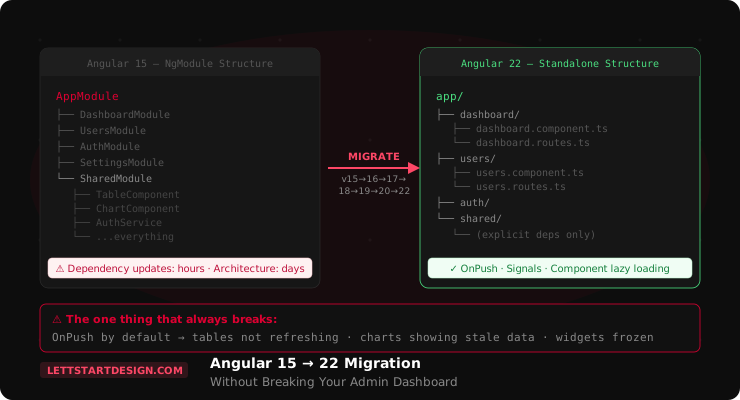
The honest summary: upgrading Angular dependencies takes hours. Refactoring the architecture takes days. Most teams underestimate the second part and over-invest in the first.
Upgrading dependencies takes hours. Refactoring architecture takes days. I have seen this consistently across every major Angular version transition. Teams budget for the npm update and are surprised by the module reorganization. Plan for both.
What Actually Changed Between Angular 15 and 22
The gap between Angular 15 and 22 covers the most significant architectural shift in Angular's history. Here is a quick reference of what changed across the versions you are crossing:
| Feature | Angular 15 | Angular 22 |
|---|---|---|
| Component architecture | NgModule required | Standalone by default |
| Change detection | Default strategy | OnPush by default |
| Reactive state | RxJS BehaviorSubject | Signals |
| Template control flow | *ngIf, *ngFor, *ngSwitch | @if, @for, @switch |
| Form management | Reactive Forms + RxJS | Signal Forms (stable) |
| API data loading | HttpClient + manual state | httpResource() stable |
| SSR support | Limited, complex setup | Improved hydration defaults |
Every row in that table represents code in your existing Angular 15 admin dashboard that will need attention during migration — not necessarily rewriting, but evaluating and deciding how much to modernize.
The Real Migration Challenges
The Angular version bump itself — updating package.json, running ng update, fixing breaking API changes — is the straightforward part. Angular provides migration schematics for most of the mechanical changes. The hard part is everything around the Angular version:
Shared Modules — The Biggest Time Sink
Most Angular 15 admin dashboards have a SharedModule — a catch-all module that exports components, pipes, directives, and utilities used across the application. In an Angular 22 standalone architecture, SharedModule does not exist as a concept. Everything that previously lived there needs to be reorganized so individual components import only what they actually need.
This is not just a refactoring task — it requires understanding every dependency in your codebase and making intentional decisions about where each piece belongs. In a large admin dashboard with 40+ screens, this takes significant time.
Lazy-Loaded Feature Modules
Angular 15 dashboards typically use module-based lazy loading. Angular 22's preferred approach is component-level lazy loading with loadComponent. Migrating each lazy route requires converting the module, its declarations, and its providers into standalone form — and testing that each route loads correctly after the conversion.
Authentication and Guards
Authentication flows in Angular 15 dashboards often depend on CanActivate class-based guards. Angular 22 uses functional guards. The migration is relatively mechanical but touches every protected route in the application — and in a dashboard with 30+ routes, that is a non-trivial amount of work to test thoroughly.
Third-Party Libraries
Chart libraries, data table libraries, state management packages, and Angular Material itself all need version updates to work with Angular 22. Not all libraries update on the same schedule as Angular. Checking compatibility before starting the migration — not after — prevents the most common migration blockers.
Step-by-Step Migration Approach
Audit Before You Upgrade
Before touching any code, document what you have. List every module, every lazy route, every third-party library and its current version. Check each library against Angular 22 compatibility. Identify which ones have Angular 22 support and which ones are blockers. Fix blockers first — do not start the Angular upgrade with an incompatible chart library in your dependency tree.
Migrate Version by Version — Not in One Jump
Do not try to go from Angular 15 directly to Angular 22 in one step. Angular's ng update works best one major version at a time. Go 15 → 16 → 17 → 18 → 19 → 20 → 21 → 22. Each step runs the migration schematics for that version, applies the mechanical changes automatically, and surfaces breaking changes incrementally. Jumping multiple major versions skips schematics and creates harder-to-diagnose issues.
# Migrate one version at a time
ng update @angular/core@16 @angular/cli@16
# Test, fix issues
ng update @angular/core@17 @angular/cli@17
# Continue through to v22Convert Modules to Standalone — Feature by Feature
Angular provides the ng generate @angular/core:standalone schematic to help automate the conversion. Run it on one feature module at a time — not the whole application at once. The schematic works in three steps — convert declarations to standalone, remove unnecessary NgModules, then switch to the standalone bootstrapping API — so run them in that order and check that the app still builds after each one. Start with a simple, isolated feature like a settings page or a profile page. Get it working standalone, verify it loads correctly, then move to the next feature. Leave SharedModule and AppModule until last.
# Run it on one feature folder at a time
ng generate @angular/core:standalone --path=src/app/users

# Then migrate the route
{
  path: 'users',
  loadComponent: () =>
    import('./users/users.component')
      .then(m => m.UsersComponent)
}Update Template Syntax
Angular provides a schematic to convert *ngIf, *ngFor, and *ngSwitch to the new control flow syntax. Run it after converting modules — not before, because mixing old and new syntax in the same module causes confusing errors.
ng generate @angular/core:control-flowReview the output manually. The schematic handles most cases but complex nested structural directives sometimes need manual adjustment.
Address Change Detection — The Most Common Post-Migration Issue
After converting to standalone components and updating to Angular 22, test every dashboard screen carefully. Pay specific attention to charts, data tables, widgets, and any component that displays data loaded from an API. If screens are not updating after data loads — this is the change detection problem. See the next section for how to diagnose and fix it.
The Change Detection Problem — What Always Breaks
This is the thing developers consistently miss after migrating to modern Angular patterns — and it causes the most visible post-migration bugs.
Angular 22 makes OnPush the default change detection strategy for new components. In Angular 15, the default strategy checked every component on every event — which meant data mutations were always reflected in the UI. OnPush only re-renders when inputs change, when an event originates from that component, or when a Signal emits.
Code that mutated objects directly — pushing to an array, modifying an object property — worked in Angular 15 because Default change detection caught the mutation. In OnPush, the reference has not changed, so the component does not re-render.
// Angular 15 — this worked with Default change detection
this.tableData.push(newRow);  // mutation — OnPush won't detect this

// Angular 22 — use immutable updates
this.tableData = [...this.tableData, newRow];  // new reference — OnPush detects this

// Better — use Signals
tableData = signal<Row[]>([]);
// Update:
this.tableData.update(rows => [...rows, newRow]);
Go through every component that loads API data and check how it handles updates. Mutation-based updates need to become immutable replacements — or better, Signal-based state. This is the architectural work that takes days, not hours.
What Angular Dashboard Customers Actually Ask
The most common migration questions from developers using our Angular templates are not about Angular APIs. They are about preserving what they have already built:
- Can I keep my existing business logic? — Yes, services and business logic are the least affected by the migration. Focus the migration on component architecture and change detection, not service logic.
- Can I keep my existing routes? — Route paths stay the same. Route configuration syntax changes — class-based guards become functional, module-based lazy routes become component-based. The migration is mechanical but requires testing each route.
- What happens to my custom dashboard pages? — Custom pages built on top of a template need the same standalone conversion as the template itself. If you have built 20 custom screens on an NgModule-based template, each one needs conversion.
- Is it worth migrating or should I start fresh? — See the next section.
Migration Checklist
✅ Pre-migration
- All third-party libraries compatible with Angular 22
- Angular Material updated to matching version
- Full test coverage exists for critical dashboard screens
- Migration plan documented — modules, routes, guards
✅ During migration
- Version-by-version upgrade — not a single jump
- One module converted at a time — not all at once
- Control flow schematic run after module conversion
- Each route tested after its module is converted
✅ Post-migration
- Every chart and data table tested with live API data
- All forms validated — login, settings, CRM screens
- Authentication flow tested end to end
- Mutation-based state updated to immutable or Signal patterns
- OnPush behavior verified on all data-displaying compo
When a Fresh Template Makes More Sense
Not every migration is worth doing. If your Angular 15 dashboard has significant technical debt — inconsistent module structure, mixed state management approaches, no test coverage — a migration to Angular 22 will surface and amplify all of that debt. You may spend more time cleaning up old problems than you save by migrating.
Starting fresh with an Angular 22 template built on standalone components and signal-first architecture from the ground up is a legitimate option — especially if your business logic lives primarily in services, which migrate cleanly and can be dropped into a new project with minimal changes.
Our Marvel Angular dashboard is built on Angular 21 — standalone components, Signals, modern control flow, and OnPush patterns throughout. Starting from that foundation rather than migrating a legacy codebase is often the faster path for teams whose existing dashboard has accumulated significant technical debt.
Marvel Angular — Built for Modern Angular Architecture
- Standalone components throughout
- Signals
- modern @if/@for control flow
- OnPush patterns
- TypeScript strict mode
If you are starting fresh rather than migrating, Marvel gives you a current Angular 21 foundation without the migration overhead.
Final Thoughts
Angular 15 to Angular 22 is a meaningful architectural migration, not a routine version update. The dependency update is the easy part. The architecture refactoring — converting modules, updating change detection patterns, reorganizing shared functionality — is where the time actually goes.
Plan for it honestly. Audit before you start, migrate version by version, convert modules one at a time, and test change detection carefully after every conversion. The developers who run into the most problems are the ones who treat this as a package.json update rather than an architectural transition.
Browse the full Angular templates collection or reach out if you need guidance on which Angular 22 template fits your project.
Start With Modern Angular Architecture
Marvel Angular — standalone components, Signals, OnPush, Angular 21.
View Marvel Angular →