
- Before and After — The Architecture Difference
- The Hardest Part of Moving to Standalone
- 5 Practical Benefits for Dashboard Developers
- Better Lazy Loading — A Concrete Performance Example
- Angular's Direction — Why Building on Standalone Matters
- Module-Based vs Standalone — Comparison Table
- Standalone-First Angular Templates
- Final Thoughts
- Standalone Angular Templates — Built the Right Way
When Angular introduced standalone components, I assumed the main benefit was removing boilerplate. After migrating our Angular templates across multiple versions and watching how the architecture change actually affects developers using them day to day — the real benefits turned out to be different from what I expected. Onboarding, maintenance, lazy loading, and long-term alignment with Angular's direction all improved in ways that are not obvious until you have lived with both approaches on real projects.
From building Angular templates: Most developers, when they first hear about standalone components, think: fewer files, no NgModule, less boilerplate. That is accurate but it undersells what actually changes. For admin dashboard templates — which are large, complex applications with many features, many routes, and many developers working across them — the architectural shift is more significant than the syntax change.
This post covers what standalone components actually change for dashboard templates, what the hardest part of the transition was, and what developers gain practically from templates built on Angular 22's standalone-first architecture.
The most common mistake during standalone migration is recreating SharedModule as a barrel file — just re-exporting everything from a shared directory. It solves the import problem but misses the architectural benefit entirely. Take the time to make dependencies explicit. It pays off when you are trying to change a shared component six months later and need to know what actually uses it.
Before and After — The Architecture Difference
The structure difference between NgModule-based and standalone Angular dashboard templates is visible immediately when you open the project.
NgModule — Angular 15 Structure
AppModule
 ├── DashboardModule
 ├── UsersModule
 ├── SettingsModule
 ├── AuthModule
 ├── ReportsModule
 ├── CRMModule
 └── SharedModule
      ├── TableComponent
      ├── ChartComponent
      ├── DialogComponent
      ├── AuthService
      ├── UtilityPipes
      └── ...everything else
Standalone — Angular 22 Structure
app/
 ├── dashboard/
 │   ├── dashboard.component.ts
 │   └── dashboard.routes.ts
 ├── users/
 │   ├── users.component.ts
 │   └── users.routes.ts
 ├── settings/
 │   ├── settings.component.ts
 │   └── settings.routes.ts
 ├── auth/
 └── shared/
     ├── table/
     ├── chart/
     └── dialog/
The NgModule structure works — but over time, SharedModule tends to become a catch-all that imports everything and exports everything. It becomes difficult to know what depends on what, and making changes to shared components risks breaking unrelated features. The standalone structure forces intentional dependencies: each component imports exactly what it uses, and nothing more.
The Hardest Part of Moving to Standalone
Converting individual components to standalone is not the hard part — the Angular schematic handles most of it automatically. The hard part is reorganising everything that previously lived inside SharedModule.
A typical admin dashboard's SharedModule contains: data tables, chart wrappers, dialog components, form controls, authentication services, utility pipes, and custom directives. In a module-based application, putting everything in SharedModule is convenient — import it once and everything is available everywhere. In standalone architecture, that convenience disappears. Every component needs to explicitly import what it uses.
The questions that take the most time to answer:
- Which components actually need the data table, and should it be a shared component or co-located with the features that use it?
- Where should authentication services be provided — at the application root or at the feature level?
- How should utility pipes be distributed without duplicating imports everywhere?
- What is the right boundary between shared infrastructure and feature-specific code?
The answers are usually better than what existed in SharedModule — but arriving at them requires thinking carefully about your application's actual dependency structure. The result is better architecture. Getting there takes time.
5 Practical Benefits for Dashboard Developers
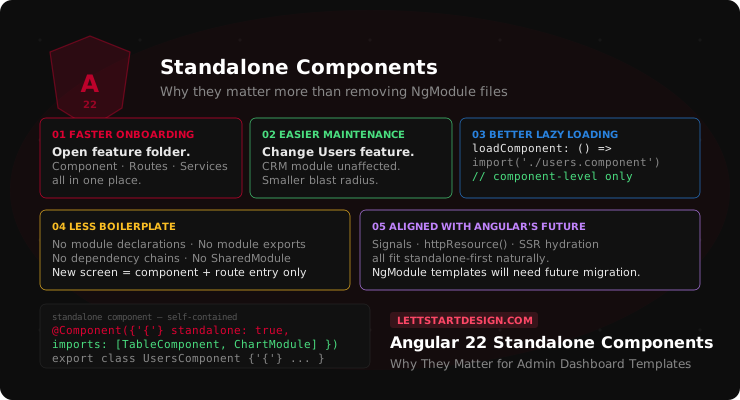
Faster Onboarding for New Developers
In an NgModule-based dashboard, a new developer joining the project needs to understand the module structure — which modules exist, what they export, how they relate to each other — before they can confidently make changes. Getting that mental model right takes time, especially in large dashboards with 10+ feature modules.
In a standalone dashboard, a new developer can open the users/ folder and immediately see the component, its route configuration, its services, and its imports — everything close together. The scope of what they need to understand to make a change in the Users feature is limited to that folder. That clarity significantly reduces the time from joining a project to making confident changes.
Easier Maintenance Across Features
Admin dashboards grow. A project that starts with a basic dashboard, user management, and settings eventually adds CRM screens, analytics, eCommerce management, and reports. In a module-based application, each new feature extends the module tree and the shared dependency graph. Understanding what depends on what becomes harder over time.
In a standalone application, modifying the User Management feature does not require understanding the CRM module or the Analytics module — because each feature manages its own dependencies. The blast radius of changes is smaller and more predictable. That is a significant maintenance advantage on large dashboard projects.
Better Lazy Loading — Initial Load Performance
Standalone components enable component-level lazy loading — loading a single component on demand, rather than an entire module. This is particularly valuable for admin dashboards where most users only access a fraction of the available features in any given session.
// Angular 22 — component-level lazy loading
{
  path: 'analytics',
  loadComponent: () =>
    import('./analytics/analytics.component')
      .then(m => m.AnalyticsComponent)
},
{
  path: 'crm',
  loadComponent: () =>
    import('./crm/crm.component')
      .then(m => m.CrmComponent)
}
With module-based lazy loading, even a small feature had to load its entire module — including all the components in that module, not just the one being navigated to. Component-level loading is more granular and results in smaller initial bundle sizes for dashboard applications with many routes.
Less Boilerplate — Simpler Project Structure
The practical reduction in boilerplate is real. No feature module files to maintain, no module declarations to update when adding a component, no module exports to remember, no dependency chains between modules to manage. A new dashboard screen in standalone Angular is a component file and a route entry. In NgModule Angular it is a component, a module update, potentially a shared module export, and a route entry.
Multiply that across a 40-screen dashboard and the cumulative reduction in boilerplate is significant — not just in initial setup but in every subsequent change.
Alignment With Angular's Long-Term Direction
Angular's team has made standalone-first the recommended approach and is building new features around it. Signals, the new httpResource API, improved SSR hydration, and future framework improvements all fit naturally into standalone architecture. Templates built on NgModule architecture will require migration work to take advantage of these features as they stabilize.
A dashboard template built on Angular 22's standalone-first architecture is positioned to adopt future Angular improvements without architectural refactoring — which matters for projects maintained over multiple years.
Better Lazy Loading — A Concrete Performance Example
The lazy loading improvement deserves a concrete example because it is the most immediately measurable benefit for users.
Consider a dashboard with these routes: Overview, Users, Analytics, CRM, eCommerce, Reports, and Settings. In module-based lazy loading, navigating to any route in a module loads all components in that module. In component-level standalone loading, navigating to Users loads only the Users component — not the Users list, Users detail, Users edit, and Users import components that might also be in the module.
For a dashboard user who primarily uses Analytics and CRM, the Users module — potentially several hundred kilobytes of JavaScript — never loads at all. The initial dashboard experience is faster, and features only pay their bundle cost when they are actually used.
Angular's Direction — Why Building on Standalone Matters
Angular's direction is clearly standalone-first. The Angular team has said this directly, and the evidence is visible in how the framework is evolving. Signal Forms, httpResource, improved hydration — all of these integrate most naturally with standalone component architecture. NgModules still work and will continue to be supported, but they are not where Angular's development effort is focused.
For a dashboard template that will be maintained and extended over several years, building on the architecture Angular is investing in reduces future migration costs. A template that is NgModule-based today will need meaningful refactoring to take full advantage of where Angular is going. A standalone-based template is already there.
Module-Based vs Standalone — Comparison Table
| Factor | NgModule (Angular 15) | Standalone (Angular 22) |
|---|---|---|
| New developer onboarding | Learn module structure first | Open feature folder, start working |
| Feature isolation | Modules can bleed dependencies | Each feature manages its own deps |
| Lazy loading granularity | Module-level | Component-level |
| Boilerplate per feature | Component + module + exports | Component + route entry |
| Shared code management | SharedModule — convenient but grows | Explicit imports — intentional |
| Signals compatibility | Works but feels bolted on | Natural integration |
| Future Angular features | May require migration | Aligned with Angular roadmap |
| Initial bundle size | Larger — module overhead | Smaller — component-level loading |
Standalone-First Angular Templates
Marvel Angular — Standalone-First Admin Dashboard
- Built on standalone components throughout — no NgModules
- component-level lazy loading
- Signals
- modern @if/@for control flow
- and TypeScript strict mode. 120+ pages
- 350+ components
- 7 dashboard layouts
The architecture this post describes is what Marvel is built on — not a future plan.
Final Thoughts
Standalone components change more than the syntax of an Angular dashboard. They change how the project is organised, how features are isolated, how new developers get up to speed, how lazy loading works, and how aligned the codebase is with where Angular is heading.
The transition from SharedModule to intentional standalone imports is the hardest part — it requires genuine thinking about your application's dependency structure rather than just running a migration script. But the result is a codebase that is easier to navigate, easier to maintain, and better positioned for Angular's future development direction.
For any Angular dashboard project starting in 2026, standalone-first is not optional — it is the correct starting point. Templates built the other way will be dealing with the transition you could have avoided by choosing the right architecture from day one.
Browse the full Angular templates collection or contact us if you need help choosing the right Angular 22 template for your project.
Standalone Angular Templates — Built the Right Way
No NgModules. Component-level lazy loading. Signals. Angular 22 ready.
Browse Angular Templates →