
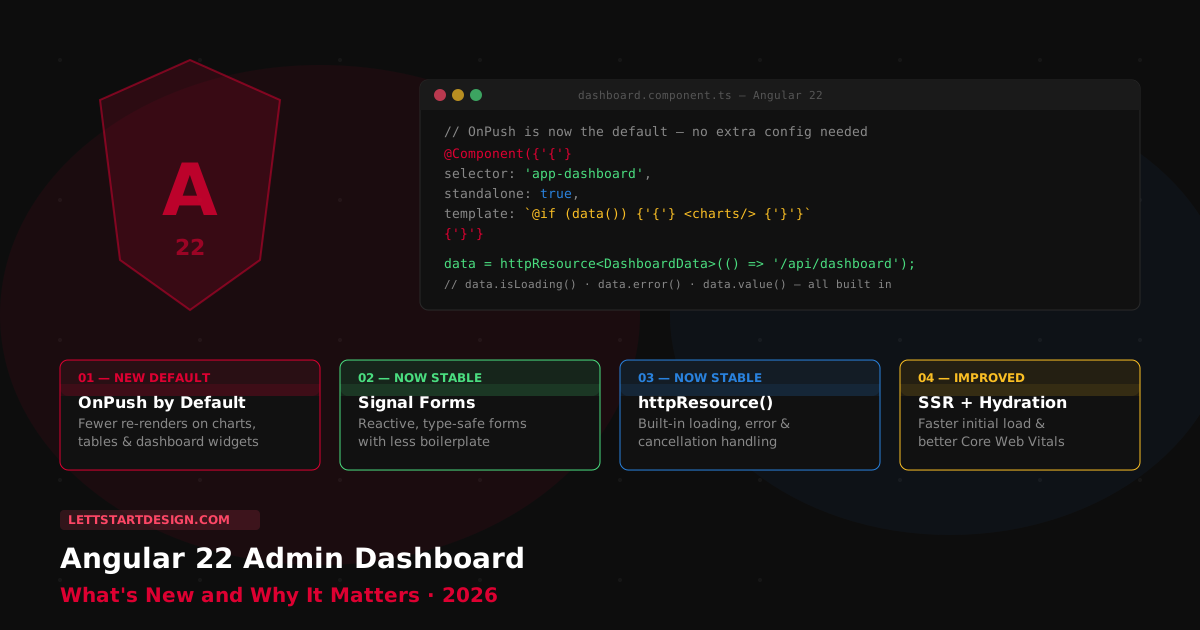
- Why Angular 22 Is Different From Previous Releases
- OnPush Is Now the Default — The Biggest Change
- Signal Forms Are Now Stable
- httpResource() — Stable Data Loading API
- Better SSR and Hydration
- Quick Summary Table
- Adminox Is Now on Angular 22
- Angular 22 Templates Worth Considering
- Final Thoughts
- Angular 22 Admin Templates — Built and Maintained
I started my career as an Angular developer and have been building Angular admin dashboard templates since 2021. Adminox — one of our flagship templates — is now live on Angular 22. When I say Angular 22 changes how dashboard templates should be built, that is not speculation. It is what I saw firsthand while doing that update.
Where I'm coming from: Most Angular releases are incremental — a new API here, a performance tweak there. Angular 22 is different. It completes the shift to signal-first architecture that has been building across several versions and makes changes that directly affect how admin dashboards perform, how forms work, and how data loads from your APIs.
If you are building or buying an Angular admin dashboard template in 2026, Angular 22 is the version to build on. This post explains exactly why — covering every change that matters for dashboard development specifically, not just the full framework changelog.
Why Angular 22 Is Different From Previous Releases
Angular has been building toward signal-first architecture for several versions. Signals arrived. Standalone components became the recommended default. Modern control flow — @if, @for, @switch — replaced structural directives. Each release added a piece.
Angular 22 completes that transition. It is not adding new features on top of the old architecture — it is making the new architecture the actual default. For admin dashboard developers this matters because dashboards are exactly the type of application that benefits most from efficient change detection, reactive form management, and clean API data loading.
A dashboard with ten charts, a live data table, notifications, and sidebar navigation is constantly receiving updates. How Angular handles those updates — how many times it re-renders components unnecessarily — directly affects what your users experience. Angular 22 makes the right defaults the actual defaults. That is what makes it worth paying attention to.
OnPush Is Now the Default — The Biggest Change
This is the single most impactful Angular 22 change for dashboard developers. Previously, Angular used the Default change detection strategy — which meant Angular checked every component in the tree on every change event, regardless of whether that component's data had actually changed. For a simple page this is manageable. For a dashboard with charts, data tables, stat widgets, and real-time metrics, it means significant unnecessary rendering overhead on every user interaction.
OnPush tells Angular to only re-render a component when its inputs change, when an event originates from that component, or when a Signal it reads changes. Developers have been able to opt into this manually for years. Angular 22 makes it the default for all new components — so you get the performance improvement automatically, without needing to remember to add it to every component you write.
For a dashboard with 20 widgets, 3 charts, a data table, and a notification feed — all updating on different schedules — the difference between Default and OnPush change detection is measurable. Angular 22 gives you that performance improvement by default.
The feature I'm most excited about as a template builder is OnPush becoming the default. Every Angular dashboard I have built or maintained has had this as a manual optimization step — adding changeDetection: ChangeDetectionStrategy.OnPush to components one by one. Angular 22 removes that step entirely. Every new component is efficient by default. That is a genuine quality-of-life improvement for anyone building or extending an Angular admin dashboard.
Signal Forms Are Now Stable
Admin dashboards are form-heavy applications. Login pages, user management screens, settings panels, product forms, CRM contact forms — almost every screen in a typical admin panel involves form state management. Angular's traditional Reactive Forms work, but they require significant RxJS plumbing that adds boilerplate and makes complex form validation harder to reason about.
Signal Forms, now stable in Angular 22, give developers a more reactive and type-safe approach to form management. Form values are signals — you read them with (), derive computed values from them, and they integrate with the same change detection system as the rest of your components. Less boilerplate, cleaner validation logic, and natural integration with OnPush components.
✅ Signal Forms Give You
- Form values as reactive signals
-
No
valueChangessubscriptions needed - Better TypeScript inference throughout
- Computed signals replace complex validators
- Natural OnPush component integration
- Less boilerplate than Reactive Forms
⚠️ Dashboard Forms That Benefit Most
- Login and authentication screens
- User management and profile pages
- Settings and billing forms
- CRM contact and deal forms
- Product and inventory management
- Multi-step onboarding flows
httpResource() — Stable Data Loading API
Dashboard templates spend most of their runtime loading data from APIs — user lists, analytics metrics, chart data, transaction records. The traditional pattern in Angular involves injecting HttpClient, managing loading states manually with BehaviorSubjects, handling errors with catchError, and cleaning up subscriptions in ngOnDestroy. It works, but it is a lot of boilerplate for something every dashboard screen needs to do.
Angular 22 stabilizes three data-loading APIs that replace most of that plumbing. resource() handles general signal-based async data. rxResource() wraps RxJS observables as signal resources. httpResource() is the HTTP-specific version with automatic loading state, error handling, and request cancellation built in.
What httpResource() replaces in a typical dashboard component:
- Manual
isLoadingboolean flags - Manual
hasErrorstate management - RxJS
catchErrorandfinalizeoperators -
takeUntilDestroyedsubscription cleanup - Retry logic and request cancellation boilerplate
For a dashboard with 15 data-loading screens — analytics, user tables, CRM lists, transaction history — httpResource() eliminates a meaningful amount of repeated boilerplate from every one of them. The template codebase becomes significantly cleaner and easier to maintain.
Better SSR and Hydration
Angular 22 continues improving server-side rendering and hydration behavior. For admin dashboards — which have historically been pure client-side applications — better SSR means faster initial page loads and a more responsive experience during the critical first few seconds before JavaScript fully executes.
This matters most for SaaS products where the admin panel is the first thing customers see after logging in. A dashboard that renders server-side before hydrating client-side feels significantly faster than one that shows a blank screen while JavaScript bootstraps. Angular 22's improved partial hydration means only components that need interactivity are hydrated — static content renders immediately without waiting for the full client-side bundle.
SSR improvements in Angular 22 for dashboards:
- Partial hydration — hydrate only interactive components
- Better deferrable views — lazy-load widgets below the fold
- Reduced layout shift during hydration — better Core Web Vitals
- More predictable SSR behavior with the signal architecture
Quick Summary Table
| Change | Status in Angular 22 | Dashboard Impact | Priority |
|---|---|---|---|
| OnPush by default | New default | Fewer re-renders on charts, tables, widgets | 🔴 High |
| Signal Forms stable | Stable API | Cleaner login, settings, CRM forms | 🔴 High |
| httpResource() stable | Stable API | Replaces RxJS boilerplate in data-loading screens | 🔴 High |
| SSR + hydration | Improved defaults | Faster initial load, better Core Web Vitals | 🟡 Medium |
| Standalone components | Established default | Cleaner module structure in all templates | 🟡 Medium |
| @if / @for / @switch | Fully established | Standard control flow throughout templates | 🟢 Already standard |
Adminox Is Now on Angular 22
Adminox — our flat-design Angular admin dashboard — is now live on Angular 22. Going through that update firsthand confirmed everything above. The OnPush default removed a manual step from every new component. The standalone architecture was already in place, which made the update significantly cleaner than it would have been from an NgModule-based starting point.
Marvel Angular — our flagship dashboard with 120+ pages — is on Angular 21.
Angular versions across our Angular templates:
- Adminox — Angular 22
- Proctu — Angular 22
- Marvel Angular — Angular 21
- ORYO Angular — Angular 20
Angular 22 Templates Worth Considering
Adminox — Flat Design Angular 22 Admin Dashboard
Now live on Angular 22. Clean flat design, Bootstrap 5, and standalone components throughout. For teams building internal tools, CRM panels, and corporate dashboards where a minimal, professional aesthetic is the right fit.
- Angular 22 — OnPush by default, standalone components, modern control flow
- Bootstrap 5 with clean flat design — zero visual noise
- Core admin components: sidebar, charts, tables, stat widgets, forms
- Well-commented SCSS — easy to customize and hand off
- Fully responsive at every Bootstrap breakpoint
Marvel Angular — Complete Admin Dashboard
Our best-selling Angular admin dashboard — 120+ pages, 350+ Bootstrap components, 7 dashboard layouts, full dark mode, Signals, and standalone components throughout. Currently on Angular 21.
- Angular 21 — Signals, standalone, modern @if/@for control flow
- Bootstrap 5.3 — complete component library throughout
- 120+ pages across SaaS, CRM, eCommerce, analytics dashboards
- ApexCharts and ECharts — 50+ chart types pre-configured
- Pre-built auth pages, route guards, HTTP interceptors
- Full SCSS variable system — rebrand in one file
Final Thoughts
Angular 22 is the most significant release for dashboard developers in several versions — not because it adds new visual capabilities, but because it changes the defaults that govern how dashboard applications perform. OnPush by default means every new component is automatically more efficient. Signal Forms stable means form-heavy dashboards have a cleaner reactive architecture. httpResource() stable means data-loading screens need significantly less boilerplate.
The practical question for anyone choosing an Angular template in 2026 is whether the template is built on Angular 22's architecture — or whether it is an older template with the version number bumped without the underlying changes. The difference shows up in performance, code quality, and how maintainable the project is over time.
Adminox is on Angular 22. Marvel Angular is on Angular 21. Browse the full Angular templates collection or reach out if you need help choosing the right template for your Angular 22 project.