
- What You’ll Get From This Post
- What I Check Before Trusting an Angular Admin Template
- What Angular 22 Changes for Admin Dashboards
- The 4 Angular Admin Dashboard Templates
- Side-by-Side Comparison
- How to Choose the Right Angular UI Kit
- Mistakes I See When Teams Pick an Admin Template
- The bottom line
- Frequently asked questions
- Angular Admin Dashboard Templates for SaaS
- Author Note
What You’ll Get From This Post
Short on time? Here is what matters most when choosing from the Angular templates and admin dashboards below:
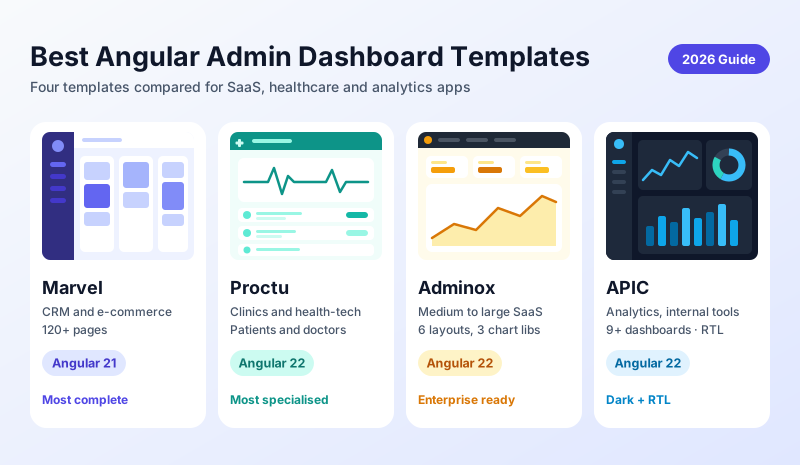
- Match the template to your product, not the screenshots. Marvel suits big multi-module products, Adminox suits medium to large enterprise SaaS, Proctu suits healthcare, and APIC suits analytics dashboards and small to mid-size apps.
- Angular 22 only helps if the code uses it. OnPush by default, Signal Forms, and httpResource() matter only when components and forms are actually written that way, so open the code, not just the demo.
- A template is a front end, not a finished product. You still need your own API, real authentication, and a plan for your unique screens. Each template includes documentation, 1 year of support, and free updates for as long as the template exists.
I have been developing Angular admin dashboard templates since 2021, and some of them are already in the work of real companies on a daily basis. There are some in the US that use Proctu for managing their clinic patients. One SaaS company contacted me to customize one of the Marvel admin dashboards as a base for their business, and a few additional widgets were added to it. By the way, such feedback helps me much more than five stars on a rating.
Why this list is short: Most "best Angular UI kits" articles feature 20+ templates the author has never actually opened. I'm going to talk about 4 Angular templates I've created and continue to develop. That way, I can give you an honest opinion on the strengths and weaknesses of each.
If you're shopping for Angular templates for a new 2026 startup or SaaS project and feel overwhelmed by the sheer variety, this article is for you. Below you'll find exactly what each dashboard template includes, who they're geared towards, and how to pick the winner for your project without spending a weekend trial-and-error testing.
What I Check Before Trusting an Angular Admin Template
All screenshots look good. The code is different because we are using templates. Before I ship or recommend any Angular dashboard, I always follow the same shortlist, and you can use these criteria when evaluating my templates as well.
- Which Angular version does it really run on
- Working forms, not just pretty inputs
- SCSS you can rebrand without a fight
- Auth pages ready to wire to your API
- Real app screens, not only a dashboard
- Someone who answers when you get stuck
The first thing is most important. A template that is two or three Angular versions behind will cost you an upgrade project in month three. Hence, I state the Angular version for each of the templates below, including the one that is not on 22 yet.
What Angular 22 Changes for Admin Dashboards
Admin dashboards are one of those apps that benefit from recent Angular defaults since they usually consist of many real-time charts, tables, and forms. There are three significant differences when choosing a dashboard as the foundation of your app.
- OnPush by default: new components re-render only when their data changes, so charts and tables stop redrawing on every click. I used to add this by hand, component by component.
- Signal Forms: login, settings, and user-management screens need far less RxJS code to manage form state.
- httpResource(): data loading comes with loading and error states built in, which replaces the usual isLoading flags and cleanup code.
The catch is that a template with only its version number bumped gets none of this. Open the code, not just the demo, and look at how components and forms are written.
The 4 Angular Admin Dashboard Templates
Proctu — Medical Angular 22 Admin Dashboard Panel
Proctu is the most specialised of the four. It is built for healthcare, with 40+ pages and 25+ components covering patient management, doctor management, appointments with a calendar, chat and email UI, a file manager, and reporting charts. It is already used at general clinics and physiotherapy centres, which is exactly the audience it was shaped around.
One thing to note is that Proctu is a front-end template. All data is static, and the login, signup and forgot-password pages are UI only, so you still need your own API, real authentication, and role-based access. Proctu is also not HIPAA-compliant on its own, because compliance depends on how your backend stores, secures and audits patient data. The benefit is that you do not have to design and code the patient, doctor and appointment screens from scratch.
- Patient, doctor, and appointment screens with a calendar
- Chat UI, email UI and a file manager
- Datatables with sorting, search and pagination, plus Chart.js, ApexCharts and ECharts
- Reactive Forms with validation
- Also available as React and Bootstrap HTML versions
Marvel — Angular Admin Dashboard for SaaS, CRM & Ecommerce
Marvel is the biggest of the four, with 120+ pages and 350+ components. It covers the screens a SaaS or CRM product usually needs: project and task management with a drag-and-drop Kanban board, invoices, e-commerce product screens, and an email UI. It supports horizontal and vertical layouts with dark and light sidebar themes, plus condensed and fixed sidebar options.
A recent customer reached out to me asking for customizations. They needed a couple of additional widgets which were specific to their use case, but the changes were small. That is how I know the template is flexible enough for different needs. You will always need some widgets that are not in the demos, so adding them is not a problem at all.
- Angular 21 with Bootstrap 5.3, ng-bootstrap 20, SCSS and TypeScript
- 120+ pages and 350+ components
- Project, task, invoice, e-commerce and email UI
- Horizontal and vertical layouts, dark and light sidebar, condensed and fixed sidebar
- Form validation, charts, and sortable tables
- Advanced UI: tours, drag and drop, range slider, rating and Alertify notifications
- Front end only: connect your own API
Adminox — Angular 22 Admin Dashboard with 70+ Components
Adminox is my go-to recommendation for medium to large enterprise teams starting a new product on Angular 22. It ships with 40+ pages, 70+ UI components, 6 layout modes you can switch at runtime, and three chart libraries (ApexCharts, ECharts and Chart.js). It also includes calendar, chat, email, project and Kanban task apps.
Adminox is a front-end template. The login runs on a demo JWT flow with a fake-backend interceptor, so you replace it with your own authentication API before going live. NgRx Signals appears on a single demo page, and the rest of the app uses plain Angular services, so you stay free to choose your own state approach. If you're planning a multi-team, multi-module rollout, starting on the latest Angular version will save you a migration later.
- Angular 22 with standalone components and lazy-loaded routes, no jQuery
- Bootstrap 5.3, ng-bootstrap 21 and TypeScript 6.0 strict mode
- 6 layout modes with a runtime switcher
- ApexCharts v5, ECharts v6 and Chart.js v4
- Calendar, chat, email, project and Kanban task apps
- Form validation, form wizard and a CKEditor 5 rich text editor
- Also available as a Bootstrap version
APIC is lighter than Marvel but still full-featured. It ships with 80+ pages, 9+ dashboard designs, vertical, horizontal and box layouts, 4 sidebar styles, and light, dark and RTL versions. The app screens include tasks with a Kanban board, notes, email, calendar, projects, a to-do list, invoices and contacts. If you want an analytics-style dashboard without Marvel's 350+ components, this is the one.
APIC is a front-end template and the data is mocked in the UI. You connect your own API or backend when you are ready, and the add, update and delete flows keep working with your responses.
- Angular 22 with Bootstrap 5.3, NG Bootstrap 21, SCSS and TypeScript
- 80+ pages and 9+ dashboard designs
- Vertical, horizontal and box layouts with 4 sidebar styles
- Light, dark and RTL versions
- Forms with validation, sortable tables and charts
Side-by-Side Comparison
| Template | Angular | Best For | Standout |
|---|---|---|---|
| Marvel | 21 | SaaS, CRM, e-commerce | 120+ pages, 350+ components |
| Proctu | 22 | Clinics, healthcare | Patient, doctor, and appointment screens |
| Adminox | 22 | Medium to large enterprise SaaS | 40+ pages, 6 layouts, 3 chart libraries |
| APIC | 22 | Analytics, small to mid-size apps, internal tools | 80+ pages, 9+ dashboards, RTL and dark mode |
How to Choose the Right Angular UI Kit
Begin with the size of your product, not the feature list. A template that is too big loses you days of deleting pages. Too small, and you have to build the screens yourself. Here is how I match the four.
Marvel: pick it for a big, many-module product
- It is by far the biggest of the four, with 120+ pages and 350+ components
- CRM, e-commerce, projects, invoices, and mail can all live in one app
- Skip it if your app has only a handful of screens
Adminox: pick it for medium to large enterprise SaaS
- Built for products with several teams, roles, and modules
- Starts on Angular 22, so a growing codebase does not begin with a migration
- Skip it for a tiny internal tool
Proctu: pick it for doctors and healthcare management
- Made for clinics, hospitals, and health-tech teams
- Patient, doctor, and appointment screens are already designed
- Skip it if your product has nothing to do with healthcare
APIC: pick it for analytics dashboards and small to mid-size apps
- At 80+ pages it is lighter than Marvel (120+), so there is less to clean up
- Good for analytics dashboards, internal tools, and products that need RTL or many dashboard layouts
- Skip it if you expect to need Marvel's breadth of 350+ components
Then run three quick checks. First, match the Angular version to your timeline. Proctu, Adminox and APIC are on Angular 22, and Marvel is on 21. Second, open the demo on your phone. Third, find the one screen you need most and see how hard it is to change.
Mistakes I See When Teams Pick an Admin Template
Most bad template choices come from the same few habits, and none of them are about the template itself.
- Choosing by screenshots. A demo hides the code. Open a component, a form, and the SCSS before you decide.
- Buying the biggest one by default. More pages sounds safer, but unused pages are code you still have to read, delete, and maintain.
- Ignoring the Angular version. A template two versions behind turns into an upgrade project right when your launch is due.
- Treating it as a finished product. A template is a front end. You still need your own API, real authentication, and a plan for the screens that are unique to your business.
- Skipping the support question. You will get stuck at some point. Check how long support lasts and who actually answers.
The bottom line
There is not one best Angular admin dashboard template, but one best suited for your product. Marvel is the largest one, suitable for products that require displaying a substantial amount of information on the screen. Proctu is the obvious choice if you are building a healthcare-related application. If you are targeting medium and large enterprise SaaS applications built with Angular 22, then Adminox is the way to go, and APIC is the lighter option for analytics dashboards and small to mid-size apps.
If you are still on the fence, take a look at the free Bootstrap 4 version of Marvel or contact me to tell me what you are building. I will advise you which solution to choose, and it is totally fine if the answer is none of them. You can also take a look at all Angular templates available.
Frequently asked questions
A UI kit contains elements such as buttons, modals, and tables. An admin dashboard UI template also includes these elements but has finished pages, layouts, auth screens, and an application UI connected. Using a template allows you to create a working interface for your SaaS much faster.
Start with the latest one your team is comfortable working with. Proctu, Adminox and APIC are on Angular 22, and Marvel is on Angular 21.
No. All four are front-end templates with sample data. The login and signup pages are UI only (Adminox adds a demo JWT flow with a fake-backend interceptor), so you connect your own API and real authentication.
Yes, indeed. I have customized Marvel for one of the clients who had requested additional widgets, and the changes were minimal. The SCSS code is organized in a way that rebranding does not require you to dig into the whole project.
The templates come with detailed documentation, 1 year of support, and free updates for as long as the template exists, so you get newer Angular and Bootstrap versions for free.
Angular Admin Dashboard Templates for SaaS
Built and maintained by me. Marvel, Proctu, Adminox, and APIC, with free updates for as long as the template exists.
Browse Angular Templates →